How To Convert Sodexo To GCash
Learn how to convert Sodexo to GCash easily! Our guide provides clear steps and answers to common questions. It’s for folks with extra Sodexo cards who want cash instead. For a smooth process and to manage your account settings, you can also visit 10.0.0.1 for helpful guidance.
Sodexo is a cool reward for people who work hard in offices. However, sometimes you may receive numerous Sodexo cards, and it’s better to convert them into cash.
Main Highlights
- Download the GCash app and make an account. Then, connect your Sodexo account to it.
- Use the “Cash In” option in GCash to move money from Sodexo. It’s fast and has no extra charges.
- After the transfer, check your GCash balance and transaction history to confirm the funds have been received.
- If something goes wrong, double-check your details, make sure your internet is working, and ask GCash support for help.
Just as understanding the process of converting Sodexo vouchers to GCash enhances your financial flexibility, exploring Jenny Mod Minecraft can significantly enrich your Minecraft experience. By adding unique characters and interactions, Jenny’s Mods offer a personalized touch to your Gameplay, much like how digital wallets streamline your financial transactions. Whether you’re managing your finances or customizing your gaming world, both processes aim to provide a more tailored and enjoyable experience.
Understanding Sodexo Vouchers
Sodexo vouchers are like rewards for work, but they’re paper-based and not ideal for online purchases. People prefer using digital wallets like GCash. Therefore, it’s essential to convert Sodexo vouchers to GCash.
Read also: How to Pay MP2 using GCash.
Is it possible to convert Sodexo to GCash?
Yes, you can transfer your Sodexo credits to GCash, but it’s not as straightforward as transferring money between e-wallets.
One way is to use the Lazada app. There, you can purchase universal gift cards and use Sodexo codes. I’ll guide you through this step-by-step so you can easily transfer your Sodexo credits to GCash.
How to Convert Sodexo to GCash: Step-by-Step Guide
Here’s what you do to change your Sodexo into GCash:
Redeeming Lazado voucher on the Sodexo+ app
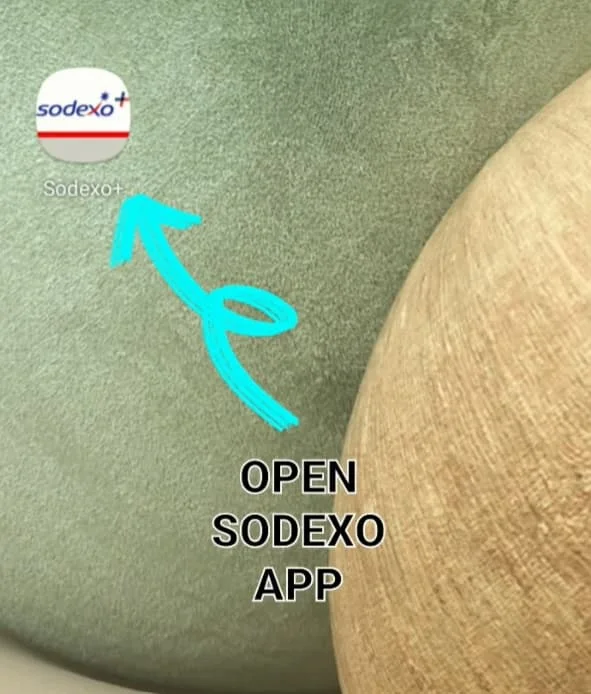
Step 1: Launch the Sodexo+ app on your smartphone.
Step 2: Tap the Shop icon located at the bottom of the screen.
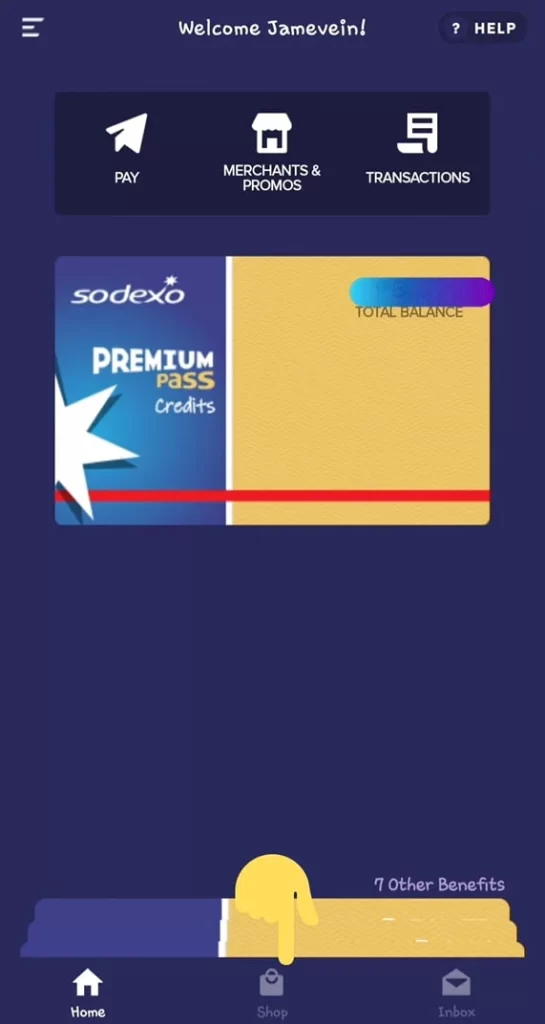
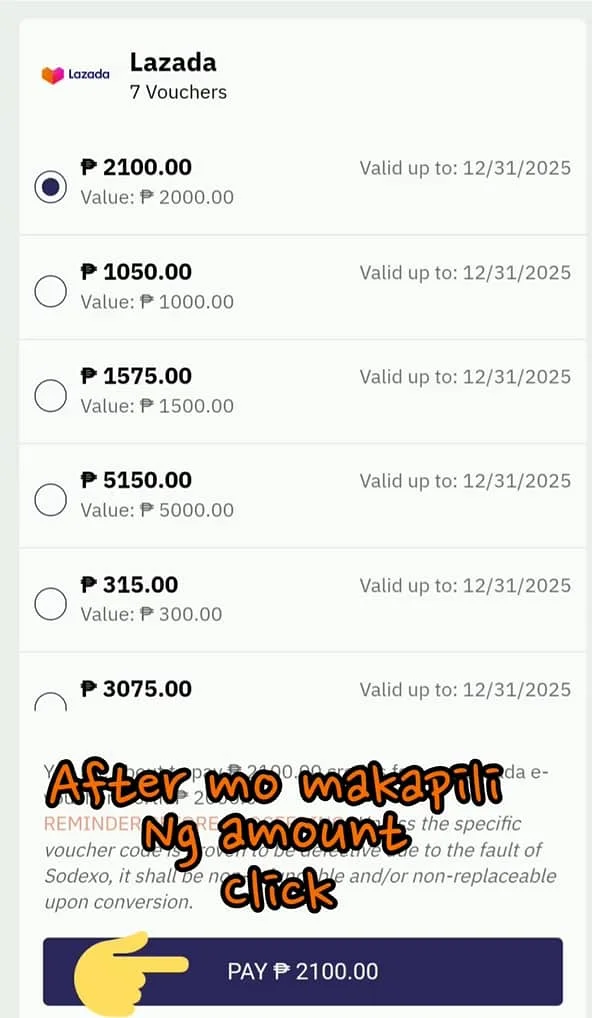
Step 3: Select Lazada and choose the number of vouchers you want.
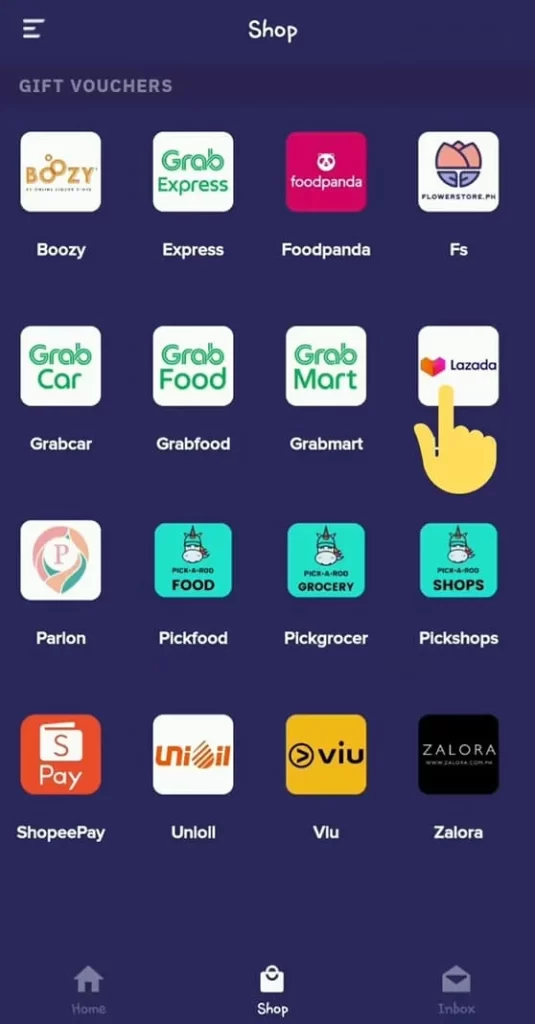
Step 4: Click or tap the “Pay” button for the amount you want to buy.
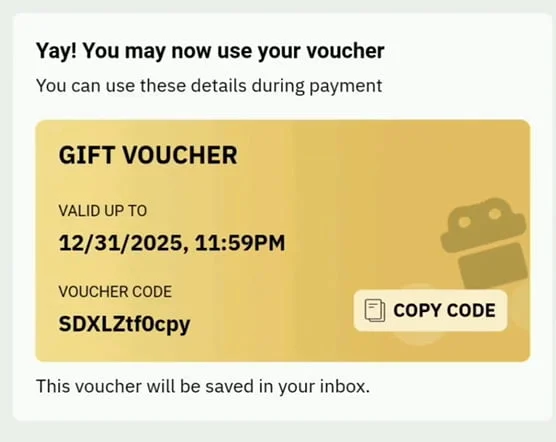
Step 5: Once you get your Lazada voucher, click the “Copy Code” button.
Getting the eGift cards on Lazada
Step 6: Launch the Lazada app on your smartphone.
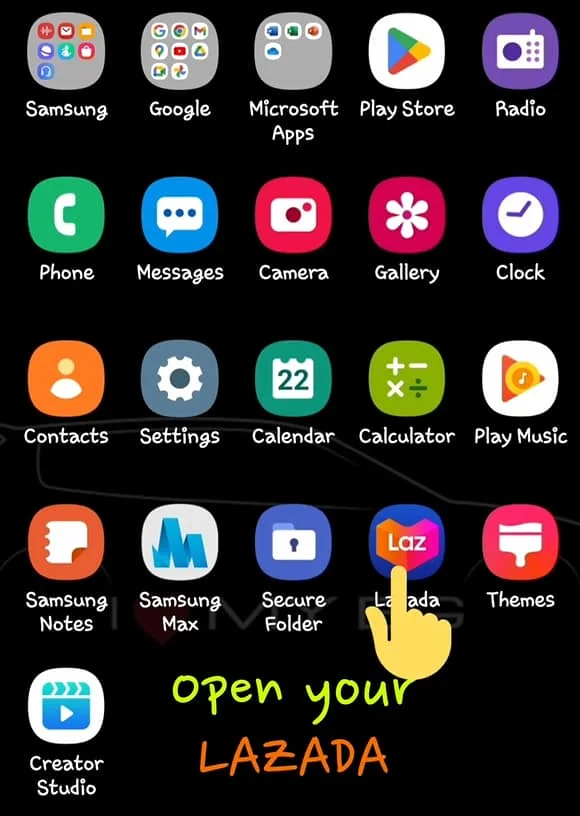
Step 7: Look for or navigate to the Giftaway, Inc. shop.
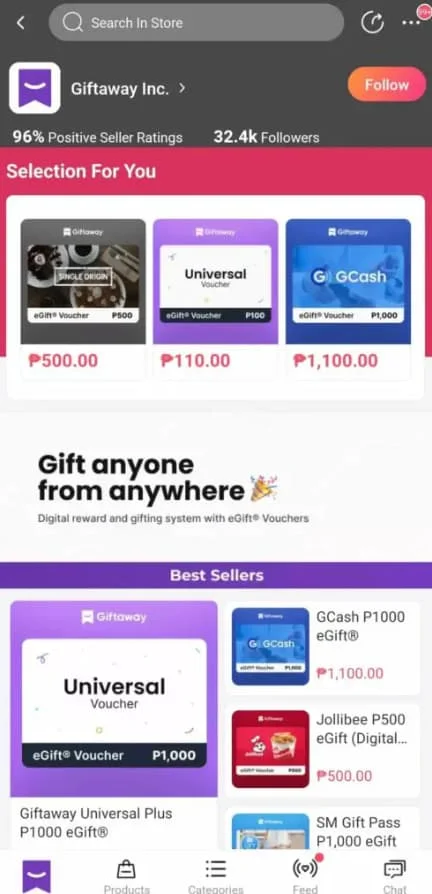
Step 8: Pick an eGift that costs less than your voucher amount.
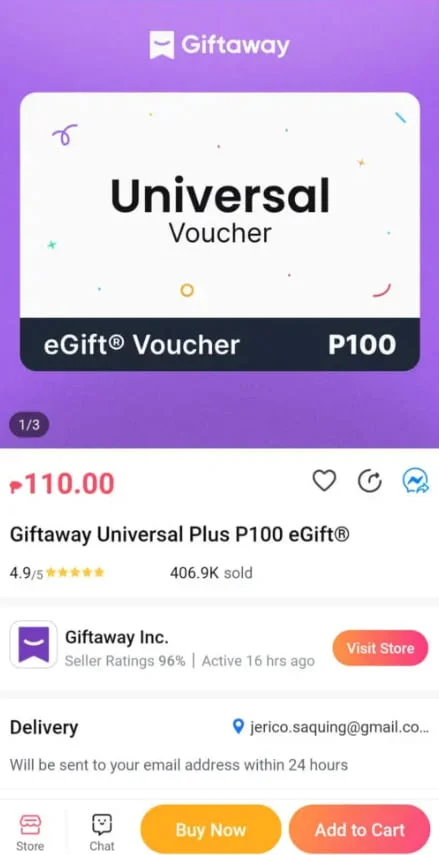
Step 9: Add the eGift to your cart and consider adding more items to maximize your voucher’s value.
Step 10: Input your email address and paste the voucher code from Sodexo.
Step 11: Click the Place Order button.
Step 12: Await a message from Giftaway in your email inbox.
Step 13: Open the email and click on the “Open Gift” button.
Step 14: Copy the code displayed in the browser window.
Redeeming eGift to GCash
Step 15: Visit giftaway.ph/gcash/redemption using your browser.
Step 16: Add the eGift to your cart and consider adding more items to maximize your voucher’s value.
Step 17: Press the redeem button.
Step 18: Wait for the confirmation screen, then press “Redeem another eGift” if you have more eGift codes to use.
Read also: How to Activate Rocket SIM
What is Sodexo?
Sodexo is a large global company that offers special rewards to its customers. They’re really good at making vouchers and cards for services. Many workers at companies receive Sodexo gift certificates as rewards. There are different types, like the Sodexo Premium Pass, Sodexo+, or Gift Pass. These give digital rewards, paper rewards, meals, medicine bonuses, and even Christmas gifts. They also have special deals for workers, partners, and customers to keep them happy.
Is there a direct way to convert Sodexo to GCash?
You cannot directly convert Sodexo credits to GCash. However, you can use Lazada, as I mentioned earlier.
Alternatively, find a friend who wants your Sodexo credits and will give you GCash in return.
For Sodexo Mobile Pass to GCash:
- Open your Sodexo+ app and check your available balance.
- Look for authorized online resellers who purchase Sodexo and pay through GCash (e.g., Facebook groups, legitimate online platforms).
- Please send your Sodexo code or a screenshot to the reseller.
- Wait for the GCash payment, which is usually processed within 10 to 30 minutes.
Important Tip: Always check for positive reviews and do a small transaction first to confirm the reseller is legit.
Benefits of Converting Sodexo to GCash
- Complete Flexibility: Spend your money on anything, not just Sodexo partner stores.
- Go Digital: Easy to use for bills, load, online shopping, and more.
- Fast Transactions: Most resellers process within minutes.
Conclusion
In conclusion, switching from Sodexo to GCash offers various options, such as using Lazada or swapping with friends. If you follow the steps or try these ideas, you can easily turn your Sodexo credits into GCash. This makes your rewards more flexible and valuable. Try it out now and see how easy it is to handle your credits!
FAQs
How can I convert my Sodexo paper gift certificate to cash?
If you have paper Sodexo passes or gift certificates, use the Sodexo+ mobile app to change them into digital credits. Follow the steps we mentioned earlier to redeem your Sodexo credits for cash.
If you have Sodexo passes that are only valid for specific stores and cannot be used with the Sodexo+ app, consider validating them at the Sodexo Makati Office.
Can I transfer Sodexo Mobile Pass to others?
You can share the Sodexo Mobile Pass by sending the 10-digit code through SMS, email, or the Mobile Pass app. You can turn it into credits using the Sodexo+ app, and then you’ll get a voucher code.
However, sometimes mobile passes from loyalty programs or consumer deals cannot be converted into credits. Typically, mobile passes provided as work benefits or gifts can be converted into Sodexo+ credits.
Can I convert my Sodexo to cash?
Sodexo gift certificates can’t be converted into cash immediately. But you can use them to get e-wallet credits. Just follow the steps we talked about before to change Sodexo to GCash. Then, you can withdraw cash by using your Mastercard to access your GCash funds, sending them to your bank account, or utilizing cash-out partners.
Can I contact GiftAway for concerns?
If you have any questions or issues with your GiftAway transaction, please email [email protected].
What merchants accept Sodexo?
Sodexo, a big company in facilities and food services in the Philippines, partners with many stores, such as:
- Yellow Cab Pizza
- Robinsons Supermarket
- Robinsons Department Store
- Fisher Supermarket
- Domino’s Pizza
- Robinsons Easymart
- Brownies Unlimited
- Okada Manila
- Medley Buffet at Okada Manila
- Lobby Lounge at Okada Manila
- Goryeo at Okada Manila
- Enbu at Okada Manila
- Les Fleurs at Okada Manila
- The Retreat Spa at Okada Manila
- Play at Okada Manila
- Red Spice at Okada Manila
- Kiapo at Okada Manila
- The Gift Boutique at Okada Manila
- The Sole Retreat by Okada Manila
- Shopwise
- The Marketplace
- Chowking
- Mang Inasal
- Latest Gadget
- Uncle Moe’s Shawarma
- Rustan’s Supermarket
- Welcome
- Bench Boutique
- Bench Body
- Bench to Go
- Herbench
- Human
- Kashieca
- Bench & Bath
- SM Supermarket
- American Eagle
The complete list is accessible through the Sodexo Merchant Locator.
Can I contact Sodexo for concerns?
If you need help as a client, please call (02) 8 689-4700. For affiliates, call (02) 8 689-4712 at Sodexo. You can also email them at [email protected] or submit a ticket for assistance.
Where can we use Sodexo Premium Pass?
You can use the Sodexo Premium Pass in the Philippines at places like SM Supermarket, Robinsons, Watsons, Jollibee, McDonald’s, Mang Inasal, Shakey’s, and Uniqlo. It works in many grocery stores, restaurants, and shopping malls. Just show your pass when you pay.

- Best Free YouTube to MP3 Converter Online - October 16, 2025
- Snapchat Planets in Order: The Complete Guide to Snap Planets - September 16, 2025
- How To Convert Sodexo To GCash - February 25, 2025